SDK Integration FAQ: Real IP, Proxy Protocol and Custom Headers
Published on 2026-09-14|By ByteShield Team
Key takeaways
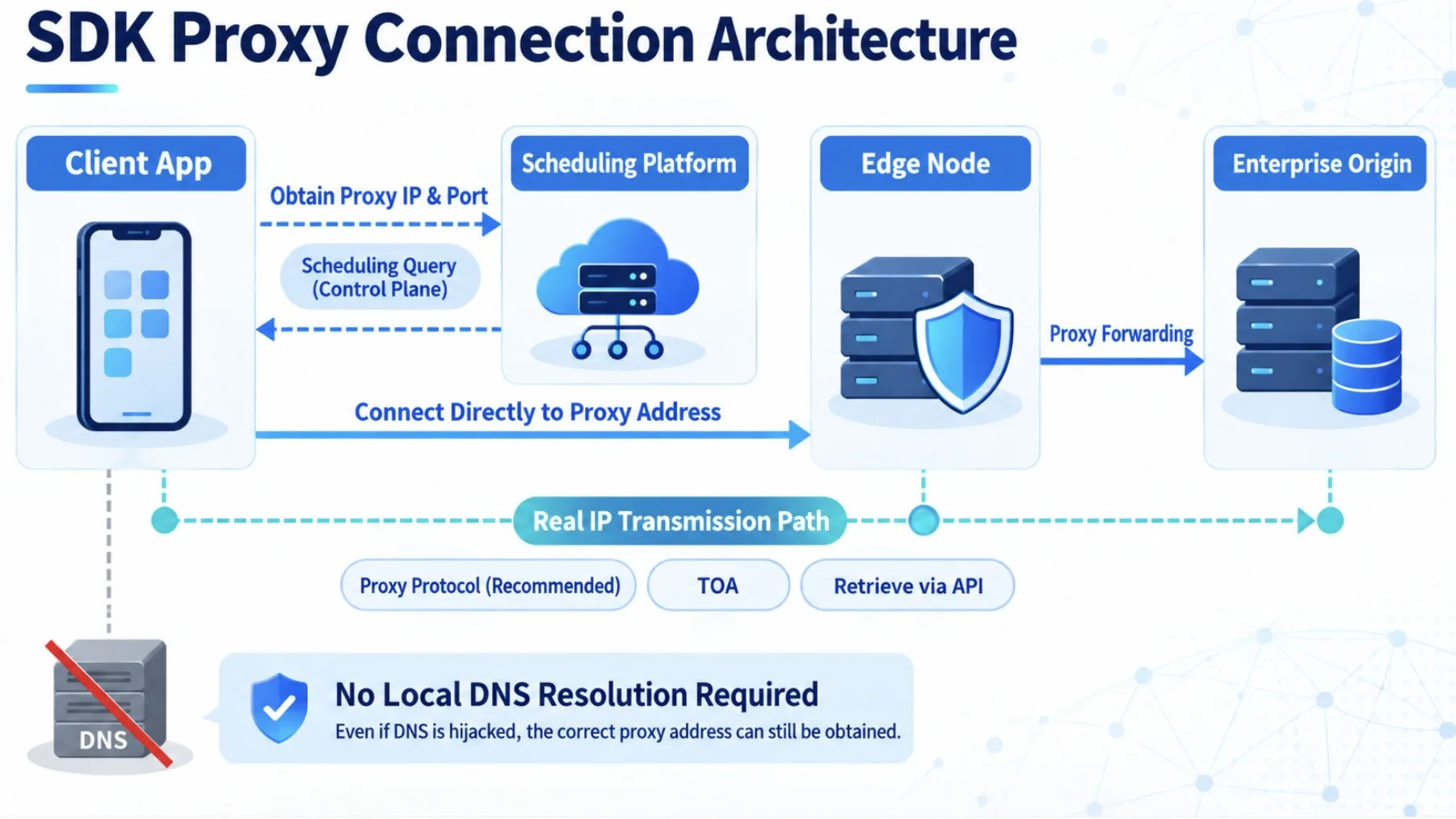
- After SDK integration, the client no longer connects directly to the origin. It first obtains a proxy IP and port from the scheduling platform, and an edge node forwards the connection to the origin. Proxy addresses change dynamically and should be re-fetched after every reconnect.
- By default the origin sees the proxy node IP. When you need the real client IP, there are three modes: Proxy Protocol, TOA, and API. If the origin supports Proxy Protocol, choose that first.
- The SDK does not add, modify, or remove headers; it passes them through as-is. Custom fields such as X-App-Version must be added by the client.
- Host header, origin firewall policy, heartbeats and health checks, and HTTPS certificate policy should all be confirmed by both sides during the POC.
- For acceptance, first verify that outbound connections show the proxy address rather than the origin IP, then run a small-percentage canary release for 2 to 3 days before rolling out to everyone.
When integrating a Security Acceleration SDK, the part that usually causes trouble is not the initialization function. It is the details the proxy architecture introduces: Does the origin see the node IP or the player IP? Can we use a Real IP header? Can the SDK add custom headers automatically? After a disconnect, does the client keep using the same proxy address?
If these questions are not settled during the POC, the SDK may compile cleanly into the app and still cause gaps in login verification, risk control, log analysis, IP blocking, or load balancing. The sections below walk through them in the order of the actual integration flow.
- Does the origin see the node IP or the real player IP? How do we pass the real IP through?
- What are Proxy Protocol, TOA, and API, and which one should I choose?
- Can the SDK automatically add custom headers (such as X-App-Version) for me?
- Why do I need to fetch a new proxy address after reconnecting? Can I reuse the old one?
How does the SDK establish a secure proxy tunnel?
Once integration is complete, the client no longer connects directly to the origin. It first obtains a proxy IP and port through the SDK, and an edge node forwards the connection to the origin. The basic flow is:
- The client initializes the SDK with its AccessKey and device identification data.
- The SDK requests an available proxy IP and port from the scheduling platform.
- The client establishes a connection using the proxy address it received.
- The edge node forwards the original business request to the origin configured in the console.
This model hides the origin IP and adjusts paths based on network quality, node health, and risk signals. Because the proxy address can change dynamically, the client should call getServerIPAndPort again for every new request, after every reconnect, and after the device wakes from lock screen, rather than caching an old IP and port for long periods.
What needs to be configured in the console before integration?
Customers can configure forwarding rules self-service in the console. Before formal configuration, we recommend taking inventory of the business domains, ports, protocols, and origin addresses that the SDK needs to protect, and isolating the origin from other unprotected services.
| Setting | Description |
|---|---|
| Virtual domain | Used internally to identify forwarding rules. It needs no public DNS resolution and no ICP filing, and it cannot become a hijacking target |
| Forwarding port | Used by the SDK to distinguish different services, for example 80, 443, or game service ports |
| Load balancing | Choose Round-Robin, or use IP Hash so that the same IP is preferentially routed to the same origin |
| Origin configuration | Enter the actual origin IP and service port; avoid exposing the origin IP directly through other services |
Is a Real IP header supported? Clarify the actual need first
Once the SDK forwards connections through proxy nodes, the network source the origin sees by default may be the proxy node rather than the end user's real IP. So if login risk control, geolocation, log auditing, or blocking policies depend on the real client IP, you need to configure a way to pass the real IP through.
Three modes are currently supported for obtaining the real client IP:
| Mode | When to use it | Implementation notes |
|---|---|---|
| Proxy Protocol | The origin or load balancer (such as Nginx or ALB) supports it | Carries the original source IP and port at the connection layer (L4); the origin must parse the PROXY protocol header. Recommended first choice |
| TOA (TCP Option Address) | Requires kernel module support on the OS or load balancer | Carries the client IP in a TCP option field; the origin needs the matching kernel module to read it |
| API | Neither of the above can be supported directly | The business system queries the platform via API for the real client IP of a given connection; suited to legacy architectures or special protocols |
In other words, "supports obtaining the real IP" does not mean "the SDK will add an arbitrary Real IP header." Which method you actually use should depend on the origin server, load balancer, protocol type, and existing logging and risk control systems. If the origin supports Proxy Protocol, we recommend choosing it first, since the architecture is usually the most straightforward.
Extra: Nginx configuration example (Proxy Protocol)
If the origin runs Nginx with Proxy Protocol enabled, add proxy_protocol to the listen directive and use real_ip_header proxy_protocol to read the real IP from the PROXY protocol header:
http {
    # Log the real client IP
    log_format main '$proxy_protocol_addr - $remote_user [$time_local] "$request"';

    server {
        listen 80 proxy_protocol;
        listen 443 ssl proxy_protocol;

        # Trusted proxy sources (in production, restrict this to the SDK edge node IP ranges)
        set_real_ip_from 0.0.0.0/0;
        # Read the real IP from the PROXY protocol header and override $remote_addr
        real_ip_header proxy_protocol;

        access_log /var/log/nginx/access.log main;
    }
}
Can I add custom headers self-service?
The SDK console currently does not offer a feature for adding custom headers. The SDK's operating principle is to pass the headers in the client's original request through to the origin unchanged, without proactively adding, modifying, or removing any header.
By design, the SDK focuses on secure proxying and traffic scheduling and does not intervene in application-layer business logic. This avoids naming conflicts between the SDK and business headers and reduces coupling for future maintenance.
If your business needs X-App-Version, X-Device-ID, X-Channel, or other custom fields, the client should add them when sending the original request. The SDK forwards existing headers along with the request but is not responsible for generating or rewriting their content.
To avoid confusion: passing the real IP is a source identification problem in the proxy architecture, while custom headers are business data defined by the application itself. They live at different layers of responsibility and are configured in different ways.
What else is easy to overlook during integration?
Origin configuration notes
- HTTP requests must preserve the correct Host header; otherwise the origin's virtual hosts may fail to determine the target service.
- SDK nodes are scheduled dynamically, so do not restrict the origin with a fixed node IP allowlist alone. The origin firewall policy should be designed jointly during the POC.
- Heartbeats and business health checks are implemented at the application layer. The SDK does not judge origin service status on the business's behalf.
Android notes
- Confirm compatibility between the ARM64-v8a, armeabi-v7a, x86, and other architectures and any other third-party SDKs.
- Add the specified ProGuard rules to prevent obfuscation from breaking the SDK.
iOS notes
- When integrating as a Framework, libz must be linked.
- After waking from lock screen or switching networks, call
getServerIPAndPortagain to obtain a proxy address.
HTTPS and certificates
- The HTTPS and certificate validation policy should be confirmed by both technical teams during the POC to ensure it matches the app's existing security design and to avoid SSL handshake failures.
How should testing and acceptance be done?
- Use a packet analysis tool to confirm that the app's outbound connections show the proxy address rather than exposing the origin IP directly.
- Confirm in your business systems and logs that the client IP obtained is the real user address, not the proxy node IP.
- Test Wi-Fi, 4G/5G, network switching, reconnecting after loss of connectivity, lock screen, and resuming from background.
- Check login, long-lived connections, API responses, packet integrity, and load balancing results.
- Run a small-percentage canary release for 2 to 3 days first, collect error logs and user feedback, then gradually roll out to everyone.
Conclusion: clarify proxy responsibilities first, and integration goes smoothly
The core of the Security Acceleration SDK is a protected, schedulable proxy tunnel, not a replacement for all application-layer logic. Real IP, headers, heartbeats, certificates, and origin security policy are shared responsibilities of the SDK, the client, and the origin.
The SDK's core value is not just the secure proxy tunnel. It also bypasses DNS resolution at the endpoint, eliminating the impact of DNS hijacking on business connections at the source, and scheduling policies can be pushed remotely in real time so routing can be adjusted without waiting for an app release. Whether these capabilities deliver as intended depends on how complete the architecture design is during integration, and Real IP, headers, and origin security policy are exactly the details most often overlooked.
Companies that take inventory of protocols, origin architecture, Real IP use cases, and custom header requirements before the POC greatly reduce the chance of discovering after integration that risk control, logging, or verification flows are incompatible.
FAQ
My origin supports Proxy Protocol. Which real IP mode should I choose?
Prefer Proxy Protocol. It carries the original source information at the connection layer, but you still need to confirm that the origin or load balancer has it correctly enabled and is parsing it.
Can I specify a different header to carry the real IP?
The SDK can help you obtain the real client IP, but the standard supported methods are Proxy Protocol, TOA, and API. The SDK does not add arbitrary headers on its own. If your application needs custom headers, the client must add them to the original request.
Does the SDK remove or modify existing headers?
No. The SDK passes the headers from the client's original request through to the origin unchanged. It does not add, modify, or remove any of them.
Why call getServerIPAndPort again for every new connection?
Proxy addresses change dynamically based on node health, network quality, and scheduling policy. Fetching a fresh address prevents the client from continuing to use a node that has expired or is no longer suitable.
Does the SDK handle heartbeats and origin health checks automatically?
No. Heartbeat mechanisms and business-layer health checks must be implemented by the application. The SDK is responsible for secure proxying, scheduling, and connection forwarding.
Does adopting the SDK affect HTTPS certificate validation?
The SDK itself does not replace or terminate HTTPS certificates; certificate validation remains in the client's original code. However, if the origin only accepts traffic from specific source IPs, the SDK edge node IP ranges must be added to the allowlist (the platform provides the list). The exact certificate policy should be confirmed by both technical teams during the POC.
If you are planning to integrate the Security Acceleration SDK into an Android, iOS, PC, or Flutter application, contact the ByteShield team. We can help you review forwarding rules, the Real IP approach, origin architecture, and the canary acceptance process.