
How Does Multi-CDN Achieve Smart Traffic Steering? From DNS Resolution to Cross-CDN Traffic Splitting and Failover
Published on 2026-10-14|By ByteShield Team
Key takeaways
- A Multi-CDN architecture needs one mechanism to manage CDN traffic entry points, and DNS Traffic Steering is one of the most common ways to do it.
- DNS Traffic Steering decides the CDN traffic entry point; it does not deliver website content itself. Once resolution is complete, the CDN handles caching, node scheduling, origin fetches, and security protection.
- Geolocation Routing assigns CDNs by geographic location, and Weighted Routing distributes DNS responses by weight. The two are independent strategies.
- Smart DNS can direct DNS queries to different CDN providers through CNAME or A / AAAA records.
- DNS failover is affected by DNS TTL, caching behavior, and existing connection state, and the backup CDN needs its domain, TLS certificate, and origin settings configured in advance.
As businesses expand into new countries and regions, global demand for access to their websites, applications, and digital content keeps growing. To make content delivery more stable and flexible, more and more businesses are adopting a Multi-CDN architecture, using different CDN providers to accelerate content across regions.
Using several CDNs at once also creates new management questions: which CDN should users in each region connect to? How should traffic be distributed between CDNs? And when the primary CDN has a problem, how do you move traffic to another provider?
DNS Traffic Steering offers a more flexible way to manage all of this.
This article starts from how DNS resolution works, explains how Multi-CDN manages different CDN providers through geographic location, weight settings, and DNS route switching, and shows how ByteShield Smart DNS helps businesses build a more controllable Multi-CDN traffic management architecture.
Why does Multi-CDN need DNS traffic steering?
A CDN (Content Delivery Network) uses nodes distributed across regions to deliver websites, images, video, and other digital content to users, reducing the latency caused by cross-region transmission.
CDN providers can differ in node coverage, network interconnection, resource allocation, and service cost. A single CDN may not meet a business's performance, cost, and service needs in every region. That is why some businesses adopt a Multi-CDN architecture, choosing the right CDN provider for each region or business need.
For example:
- CDN A for the Taiwan and Hong Kong markets.
- CDN B for the Japan and Korea markets.
- CDN C for the US and European markets.
In an architecture like this, the business needs one mechanism to manage CDN traffic entry points, and DNS Traffic Steering is one of the most common ways to do it.
With routing policies at the DNS layer, the business can decide which CDN's access information to return before the user connects to a CDN, so that DNS queries from each region are directed to the designated CDN service.
What is DNS Traffic Steering, and how does it split traffic across CDNs?
DNS (Domain Name System) translates domain names into the information needed for a network connection, such as an IP address.
In a normal DNS resolution, when a user visits a website, the DNS Resolver queries the matching DNS records to get the site's connection address. DNS Traffic Steering adds a routing decision to this resolution step, returning different DNS records based on preset conditions.
Take a business that uses two CDNs: suppose its website is www.example.com, and it uses both ByteShield CDN and another CDN provider.
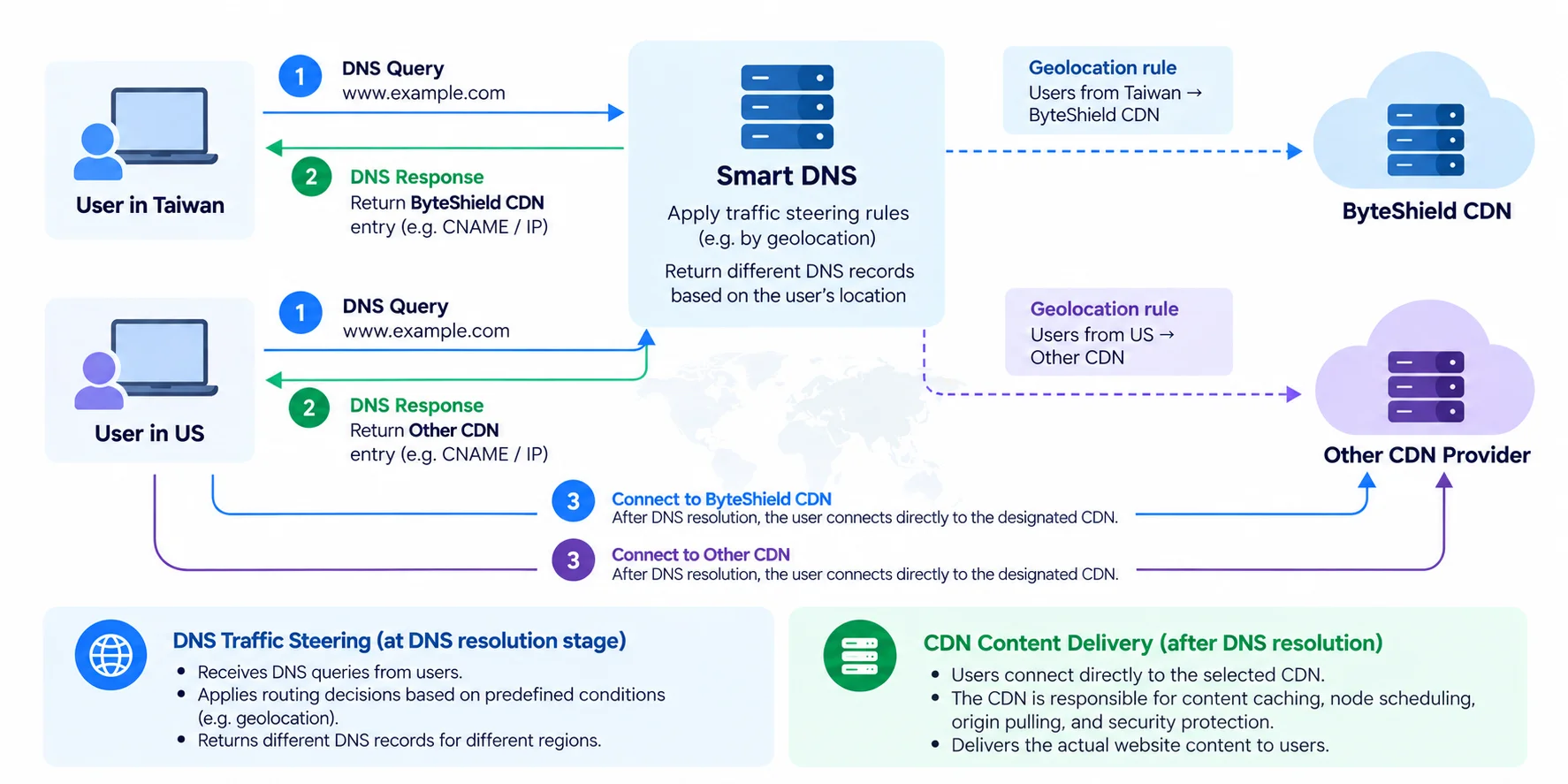
When a user in Taiwan queries the domain, Smart DNS can follow a geolocation routing rule and return ByteShield CDN's access information. When a user in the US queries the same domain, it returns the other CDN's access information.
So even though users visit the same website domain, they may connect to different CDN providers depending on the DNS routing policy.
Note that DNS Traffic Steering decides the CDN traffic entry point; it does not deliver website content itself.
After DNS resolution, the user connects directly to the designated CDN, which then handles content caching, node scheduling, origin fetches, and security protection.
Two common DNS traffic steering methods for Multi-CDN
In a Multi-CDN architecture, businesses can use different DNS routing strategies depending on their needs.
1. Geolocation Routing: assign CDNs by geographic location
Return a specific CDN's DNS records based on the geographic location of the DNS query source.
For example, a business could configure:
- Users in Taiwan go to ByteShield CDN.
- Users in Japan go to CDN B.
- Users in the US go to CDN C.
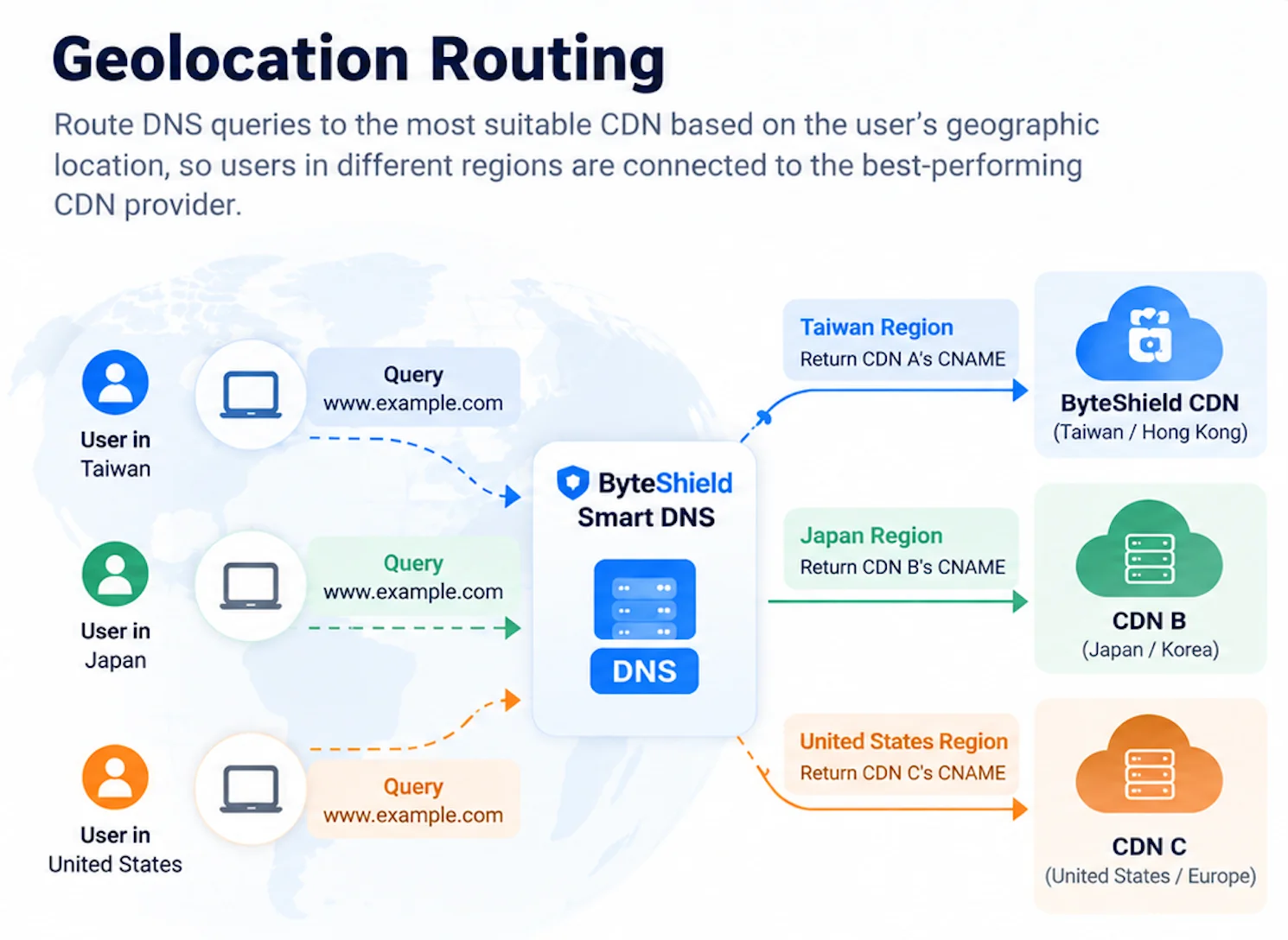
With geolocation routing, businesses can manage their CDN strategy for each region based on market needs, CDN coverage, or resource allocation.
ByteShield Smart DNS supports city-level Geolocation Routing, so beyond countries and regions, businesses can configure CDN routing for more granular geographic areas.
That said, location detection can still be affected by the DNS Resolver, EDNS Client Subnet (ECS), and the accuracy of IP geolocation data, so the DNS result may not always match every end user's actual location.
2. Weighted Routing: distribute CDN traffic by weight
Besides geographic location, businesses can also use Weighted Routing to assign relative weights to different CDNs.
For example:
- ByteShield CDN: 70%
- CDN B: 30%
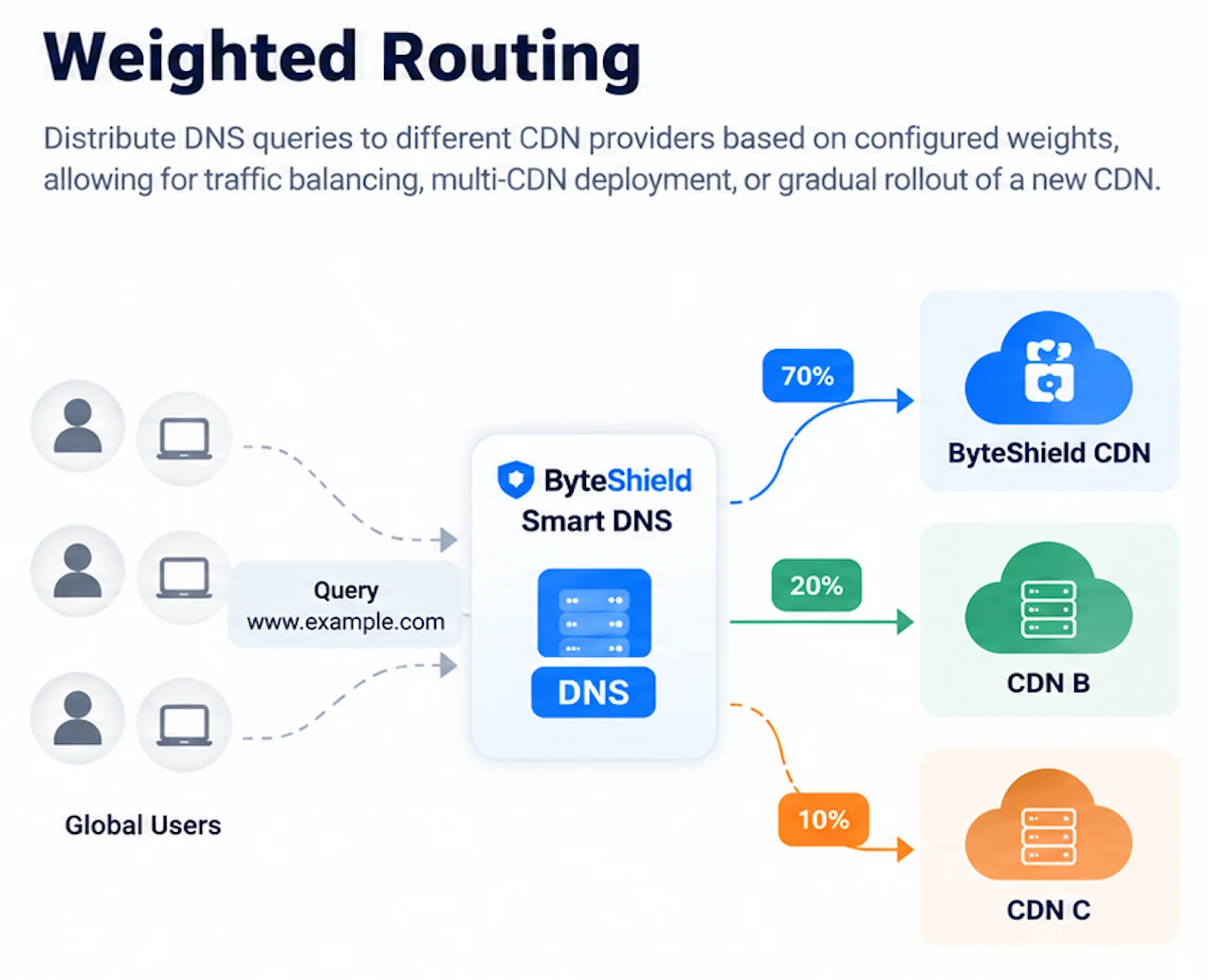
When a DNS query reaches Smart DNS, the system chooses which CDN's DNS records to return based on the configured weights. This suits businesses that need to distribute DNS queries across CDNs, or that want to onboard a new CDN provider gradually.
For instance, when testing a new CDN, a business can start with a lower DNS routing weight, observe how the service performs, and then adjust the settings as needed.
Note that Weighted Routing sets the relative proportion of DNS responses. It does not guarantee that actual HTTP request counts or bandwidth will follow exactly the same proportion. Geolocation Routing and Weighted Routing are also independent strategies and cannot be combined in the same routing rule.
How does DNS direct users to different CDNs? CNAME and IP onboarding explained
In a DNS steering architecture, Smart DNS can direct DNS queries to different CDN providers through CNAME or IP records.
1. CNAME onboarding: the CDN handles node resolution downstream
A CNAME (Canonical Name) points one domain name to another.
For example, if a business's website domain is www.example.com, Smart DNS can follow the routing policy and return the designated CDN's access domain (such as customer.cdn-provider.example).
The DNS Resolver then continues resolving that CDN access domain to get the IP address needed for the connection. This lets Smart DNS handle the choice between CDN providers, while each CDN keeps managing its own Edge nodes and IP scheduling.
ByteShield Smart DNS also supports CNAME onboarding for the Root Domain, so in addition to subdomains like www.example.com, businesses can bring root domains like example.com into their Multi-CDN traffic steering architecture, giving them more deployment flexibility across different domain onboarding methods.
2. IP onboarding: return a specific connection address directly
Besides CNAME, Smart DNS can also return a specific IP address through A or AAAA records.
When a CDN provider offers IPs or Anycast IPs suitable for fixed configuration, businesses can set them as DNS routing targets.
But if the CDN uses dynamically adjusted node IPs, businesses should first confirm whether the provider allows fixed IP onboarding, to avoid service disruption when nodes change.
Whether you use CNAME or IP, the core role of Smart DNS is to manage DNS resolution results, not to replace the CDN's own node scheduling and content delivery.
How can Multi-CDN use DNS to build a failover mechanism?
Beyond distributing traffic, DNS Traffic Steering can also help businesses build failover switching across CDNs.
Suppose a business mainly uses ByteShield CDN and has another CDN preconfigured as a backup provider. Under normal conditions, DNS routing directs queries to the primary CDN. When the primary CDN has a service problem, or the business needs to perform maintenance, administrators can adjust the DNS routing settings so that subsequent DNS queries go to the backup CDN.
This lets a business change its CDN provider strategy without changing its public website domain. But DNS failover does not mean traffic switches instantly and seamlessly. Because DNS Resolvers may cache previous resolution results, the actual switchover time depends on DNS TTL, caching behavior, and the state of existing connections.
In addition, the backup CDN must have its domain, TLS certificate, origin, and related service settings configured in advance before it can serve content after the DNS route switch.
ByteShield Smart DNS currently supports manual failover switching and does not provide automatic health checks or automatic failover. Businesses can adjust routing settings through the management console, the API, or with help from ByteShield engineers.
ByteShield Smart DNS: a more flexible Multi-CDN traffic management architecture
ByteShield Smart DNS is a smart DNS traffic steering service designed for Multi-CDN architectures. It helps businesses use routing policies at the DNS layer to manage traffic entry points across regions and CDN providers.
- City-level geolocation routing: Configure Geolocation Routing down to the city level to set CDN strategies for different markets.
- Weighted DNS traffic distribution: Use Weighted Routing to set relative weights for different CDNs, supporting Multi-CDN traffic splitting and testing when onboarding a provider.
- Multi-CDN onboarding management: Use a CDN access CNAME or a suitable IP as the DNS routing target, so businesses can combine CDN resources from different providers.
- Flexible DNS deployment: Supports both NS Delegation and CNAME onboarding modes, so businesses can choose the integration that fits their existing DNS architecture.
- Multiple management options and custom TTL: Manage DNS routing through the management console, the API, or with help from ByteShield engineers, and customize DNS TTL as needed.
- Manual CDN failover: When the primary CDN has a problem or needs maintenance, administrators can manually adjust routing to send subsequent DNS queries to other configured CDN providers.
ByteShield Smart DNS focuses on cross-CDN routing management at the DNS layer. It does not interfere with each CDN provider's content caching, WAF, DDoS protection, or origin mechanisms, so businesses can build a unified way to manage DNS traffic while keeping their existing CDN architecture.
Smart DNS makes Multi-CDN architectures easier to manage
Multi-CDN is not just about using several CDN providers at once. What matters more is whether a business can flexibly adjust its CDN traffic entry points based on region, business needs, and service status.
With DNS Traffic Steering, businesses can build cross-CDN routing management at the DNS resolution stage, use Geolocation Routing and Weighted Routing to configure different CDNs, and set up a failover procedure through manual route switching.
Through city-level geolocation routing, weighted DNS distribution, Multi-CDN onboarding management, and flexible operation options, ByteShield Smart DNS helps businesses build a more controllable global traffic steering architecture.
To learn more about how a CDN distributes traffic at the edge layer, see "Using CDN as a Front-Line Load Balancer".
FAQ
Why does Multi-CDN need DNS traffic steering?
CDN providers can differ in node coverage, network interconnection, resource allocation, and service cost, so a single CDN may not meet your needs in every region. DNS Traffic Steering decides which CDN's access information to return before the user connects to a CDN, giving you one place to manage CDN traffic entry points.
What is the difference between Geolocation Routing and Weighted Routing?
Geolocation Routing returns a specific CDN's DNS records based on the geographic location of the DNS query source. Weighted Routing assigns relative weights to different CDNs, which suits distributing DNS queries or gradually onboarding a new CDN provider. They are independent strategies and cannot be combined in the same routing rule.
After DNS switches to a backup CDN, does traffic switch immediately?
Not necessarily. DNS Resolvers may cache previous resolution results, so the actual switchover time depends on DNS TTL, caching behavior, and the state of existing connections. The backup CDN must also have its domain, TLS certificate, origin, and related service settings configured in advance before it can serve content after the switch.
Does ByteShield Smart DNS support automatic failover?
ByteShield Smart DNS currently supports manual failover switching and does not provide automatic health checks or automatic failover. Businesses can adjust routing settings through the management console, the API, or with help from ByteShield engineers.
If your business uses several CDN providers, or wants to improve how it manages CDN resources across regions, explore ByteShield's SCDN service, or contact the ByteShield team to learn how Smart DNS can help you plan the right Multi-CDN traffic steering strategy.